Sunday, August 25, 2013

Amazon Authentication failed. How to recovery

The problem with EC2 instance when I try to connect via SSH. Authentication failed.Permission denied
  1. Stop the running EC2 instance
  2. Detach its /dev/sda1 volume (let's call it volume A)
  3. Start new t1.micro EC2 instance, using a new key pair
  4. Attach volume A to the new micro instance, as /dev/xvdf
  5. SSH to the new micro instance and $ sudo mkdir /mnt/tmp
  6. $ mount /dev/xvdf  /mnt/tmp
  7. $ cd /mnt/tmp and copy all needed data
  8. You can try to change  keypair for you your old instance on a new
     Copy ~/.ssh/authorized_keys to /mnt/tmp/home/ubuntu/.ssh/authorized_keys
  9. Logout
  10. Terminate micro instance
  11. Detach volume A from it
  12. Attach volume A back to the main instance as /dev/sda1
  13. Start the main instance
  14. Login as before, using your new .pem file

Monday, March 18, 2013

Quickly open a Command window on a folder in Windows 7

It is rather tedious to change the folder in the command line. If you use Windows 7 or Vista you can open a Windows Explorer, browse to the required folder. Hold the SHIFT key while you right-click the folder and select the context menu "Open command window here".

Saturday, July 7, 2012

Calculation of the optimal darts strategy


In the game of darts, players throw darts at a board to score points.
The circular board has a 'bulls-eye' in the center and 20 slices
called sections, numbered 1 to 20, radiating out from the bulls-eye.
The board is also divided into concentric rings.  The bulls-eye has
two rings: an outer 'single' ring and an inner 'double' ring.  Each
section is divided into 4 rings: starting at the center we have a
thick single ring, a thin triple ring, another thick single ring, and
a thin double ring.  A ring/section combination is called a 'target';
they have names like 'S20', 'D20' and 'T20' for single, double, and
triple 20, respectively; these score 20, 40, and 60 points. The
bulls-eyes are named 'SB' and 'DB', worth 25 and 50 points
respectively.

There are several variants of darts play; in the game called '501',
each player throws three darts per turn, adding up points until they
total exactly 501. However, the final dart must be in a double ring.


Often there are several ways to achieve a total.  You must return a
shortest possible list.

It was tasked to create a program to solve this problem. I used Python  and Google Application Engine for this. First of all I've defined shortest way to win from each point of the game. For example , your current score is 170 and the program calculates that the shortest way to win is T20,T20 and DB (bull-eye)  . But real darts players have different accuracy. I've used the simple test for the player's accuracy. He should hit bull-eye 100 times and calculate his correct hits. The program recalculates this value in Gaussian deviation and defines probability of hitting each target on the darts board. After that the program shows optimal targets for a next turn. If  your accuracy more than 50% the program show the shortest way to win, but if you're not a such experienced player  the program will recommend  a more likely way to achieve the win.
I've implemented the optimal strategy algorithm in the small web application in GAE. You can see it here Darts Strategy  I think it will work on Android and iPhone too.

Saturday, June 23, 2012

IT Garden Diary-Second step -define plant care

Each plant requires care. It can be watering, fertilizing, weeding, pruning, etc.You have to do each procedure in a particular time and place. IT Garden Diary will help you organize all of these procedures and will remind you what  to do today and where. Open the Plant list and click on the button "Care" for any plant. Click the button "Create new". Enter all needed parameters for this procedure Start Date, End Date and Repeat every.


Save this procedure and check the Todo list. You'll see several new deals in it .
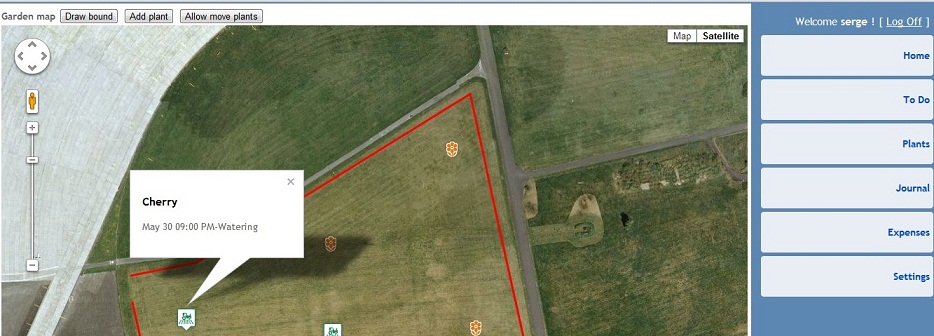
Click on the button Map and you'll see the a small markers with a tractor  on the map of your garden. There are places of your today works. Click on any marker and you will see what should you do.

IT Garden Diary-First step adding plants

First of all, you should register your garden at gardendiary.azurewebsites.net . Then click on the Map icon and find your place at Google Maps. Click the button "Draw bound" and draw bound of your garden on the map. After that, click the button "Save bound".
Now, you can place plants on the map using the button "Add plant" . You should enter a name for each plant in the prompt dialog box. Click the button "Save plants" and IT Garden Diary will save all locations at the garden map.If you open the Plant list you'll see all added plants in it. You can edit any records and enter additional information about your plants. itgardendiary

Wednesday, June 20, 2012

Why I've created Garden Diary

This application was created at the request of my wife Victoria. She loves house plants and cares for a small indoor garden. Several times I started working on this problem, but every time delayed due to other cases. At first, I planned to write a small program for desktop computers, but then I thought that the gardeners are not very convinient to walk around the garden with a computer. As time went on sale tablets iPad, Andoid and other. But I did not know very well how to write applications for them. So I decided to make a web application running on any device. It's really cool when any user starts to work immediately with your application without any installations and configurations. Now that everything is almost ready I can say what Garden Diary can do. First, you can record all your plants, along with their pictures. Then enter for each plant the necessary procedures that you do on a regular basis such as watering, fertilizing, weeding and so on. All procedures are automatically placed in the to-do list that needs to be done, and then implement them in your annual Gardener's Journal. Just in time to create this application, I listened to amazing lectures by Steve Huffman on udasity.com where he suggested how to use Google Map in own web applications. It was a great idea. Now, any gardener can show all his plants directly on the map and the program will show when and where he should work now. I hope Garden Diary will be useful not only my wife but also to other gardeners and plant lovers. itgardendiary

Friday, March 23, 2012

Online inventory system SaaS

We are going to start soon a new web service for inventory accounting. It will an online inventory system for apparel and other business. Nothing to install register your account and work from any device.

Tuesday, January 31, 2012

Paging for MS SQL query

It's a usual task get some records from a big table. MySql has a simple operator Limit offset,pagesize
If you want to get 16-20 records from the table Customers you write in MySql
SELECT * FROM Cbstomers LIMIT 15,5

It's a not trivial task for MS SQL query. We should write the next query :

SELECT * FROM (SELECT TOP 5 CustomerID,FullName From (SELECT TOP 20 Customers.CustomerID, Customers.FullName
FROM Customers
ORDER BY Customers.CustomerID ASC) As T2 Order by CustomerID DESC) ORDER BY CustomerID ASC;

page size=5
current page=4
current page x page size=20

Wednesday, July 20, 2011

Insert XML examples in a blog

When I wrote the previous blog, I encountered a small problem. How to insert an example of my XML file in the blog. I'm using the Notepad function Edit-Replace. First I've replaced the symbol < on &lt;


Then, I've replaced the symbol > on &gt;.


After that, I've copy pasted the new text in my blog.

Tuesday, July 19, 2011

HTTPS in Google Application Engine

Now I'm playing with Google Application Engine.GAE is a terrific tool for learning requires. If you want to work with your application via HTTPS simple add the next lines to web.xml:
<security-constraint>
<web-resource-collection>
<web-resource-name>all</web-resource-name>
<url-pattern>/*</url-pattern>
</web-resource-collection>
<user-data-constraint>
<transport-guarantee>CONFIDENTIAL</transport-guarantee>
</user-data-constraint>
</security-constraint>

You do not need to buy a certificate and not need to configure anything.

Sunday, April 10, 2011

MySQL and ADO

I am getting this error message in VB6 with MySQL

-2147217864 Row cannot be located for updating. Some values may have been changed since it was last read.
I've opened recordset and change some fields . Then I tried to update recordset and had the error message
Set rsCt = New Recordset
rsCt.CursorLocation = adUseClient
rsCt.open SQLstring, mConn, adOpenStatic, adLockOptimistic
rsCt!OrderNumber = pbOrderNumber
rsCt!CustomerID = custID
rsCt.Update

I spent several hours searching for a solution. Changed primary keys in my tables,used different options in rsCt.Open . And eventually found a small message on forum.mysql.com


Open properties fo your DNS (Windows XP: Control Panel->Administrative Tools->Data Sources) and find option Return Matching Rows (turn it on).

Also, you can do this under connection string specity parameter OPTION=2.

This should work...

Osman :D

I added to my connection string option=2

ConnectionString = "driver={MySQL ODBC 5.1 Driver};option=2,server=" & mySqlIP & ";uid=" & usr_id & ";pwd=" & pass & ";database=" & Database

Finally the problem is solved. Thanks Osman!!!

Friday, January 28, 2011

Barcode inventory system

It is not so difficult to do for your business an inventory system with bar codes. Golden Inventory is a barcode inventory system.The inventory accounting system can help you to improve the manageability of your warehouses and the company.See an example of designing inventory system and create own system for your business. You can make a warehouse inventory system either a point of sales and inventory system .

Your own online inventory system.

You can create a modern own online inventory system using .net inventory source code You get complete ASP.NET source code of the system for a relatively small fee. You can adapt the inventory system for your business and gain maximum effect with small investments.You read more about online inventory system and make the right decision.

Thursday, January 20, 2011

What do we want from inventory software?

It's a typical request from my client about inventory software
It seems that your basic inventory program will provide all the information needed by my business but the methods of performing all the tasks is beyond my intuitive capacity. My business needs a rather simple point of sale program that would maintain an inventory.

Primary need for business management:

  • Create Sales Receipt
  • Create Sales Receipt with Labor being a variable amount.
  • Create Sales Receipt with taxable and non taxable items. ie. Labor, resale exempt
    Create Sales Receipt for a Special Customer Order of a inventory or non inventory items showing the customer’s deposit and balance.
  • Create Special Order Receipt with customers name and phone number and be able to retain, recall and update the infromation when item is delivered
  • Create Sales Receipt for items that are not in inventory on the fly.
  • Create Sales Receipt and automacally adjust inventory quantity.
  • Create Sales Receipt with several terms of sale printed on it. "3 Day Retutn"
  • Create Sales Receipt and add a special note or instructions.
    Ability to search and review special orders or open sales receipts by customer or invoice number.
  • Allow for inventory anjustment, quantity and pricing.
  • Maintain a list of manufacturers or supplies.
  • Maintain a list of customer information for some, not all sales.
  • Would like a daily and monthly sales reconcilliation.

I have been working with your inventory software as downloaded and find many things quite easy. The inventory and sale of inventoried items seem just fine. I have had trouble understanding or finding how to preform the following:

Making items taxable or not on a given sale receipt.

How can I make up a labor ticket which allows for non taxable labor and taxable parts?

How can I make up a labor ticket that retains the customer name and phone number and allows for updating with the addition of parts utilized and then provide a sales receipt?

How do I take a deposit on a special order of an inventory or non inventory item, then then update the transaction when the items is picked up and provide a sales receipt?

How do I set up a group of special terms of sale to appear on all sales receipts?
We usually answered that our inventory software can make all these functions and clarify how it works.

You can use our Golden Inventory system. You can use Invoices and
Sales Receipts
for tracking you sales. If you sell items for cash you
use sales receipts if you want to track customer payments and balances
you should use invoices. Sales receipts don't change customers
balance.

You can add in the items list inventory and non-inventory part for
labor.Set the option "Non stock" for labor. You can set the option Tax
Invoice for any item.

Create a new invoice and select a cusomer in the drop down list. If
it's the new customer enter his name in the field customer. Click the
button Items and select inventory parts and labor. Click the button
Enter and close the items list. You can change quantity for any item
and change the Taxable. If you don't have any item in the item list
you can enter it in the invoice detail section and program will add
it to the items list after saving your invoice. You can use the button
"Paid" for entering a customers deposit.

The inventory system keeps all customers in the special table.
You can view it in the left menu Lists the Items ,Customers and
Vendors lists. The program has the Adjustment and Report functions.
Golden inventory decrease quantity on hand for items when you create
invoice or sales receipts.


You can use Sales Orders for your labor tickets. Than, you'll be able
to create a new sales receipt or invoice and download all information
from this Sales Order. Use the small button near the field Sales
Order No.

You can use the field Status in invoices and sales receipts. The
inventor system calculates only approved documents.
All documents has the field Group below the field Comments.

Monday, January 3, 2011

Free Excel Invoice template

If you are just starting your business and do not have enough spare cash to buy any inventory system, you can use free utilities. For example, the free invoice template for MS Excel.Download the free Excel invoice template. Open the invoice template in Microsoft Excel.Unprotect the Invoice worksheet. The Invoice worksheet is protected to avoid accidental damage formulas and fixed cells. To unprotect it, in Excel 2000/XP/2003 click Excel menu Tools -> Protection -> Unprotect Sheet, or in Excel 2007/2010 click Review tab -> Changes group -> Unprotect Sheet. Enter your company name and address. Then protect the sheet again. After that, you'll be able to fill out your invoices and print them for your customers. Excel will automatically calculate line totals,taxes and grand total for each your invoice.

Thursday, December 9, 2010

Online inventory systems

What is an online inventory system? This software is located on a Web server and works with your inventory database.You can connect to the database from any computer using a web browser. You use a personal password and encrypted connection over the Internet.This is a convenient solution for companies with branches in different cities or remote stores and warehouses. You can create a new order in the client's office. You can check the real on hand quantity of goods while you are on the way to the customer.You can quickly organize a point of selling your goods at a remote location. You will need only internet connection. You can use the SilverNet online inventory system.It is an inexpensive and effective solution for creating your own online inventory system for any company

Monday, November 29, 2010

Point of sale function in an inventory system

If you sale your goods in a retail store the best way to track sold products is using the Point of Sale form. Of course, this is not a complete point of sale station with a cash register and a receipt printer but it is more cost-effective solution when you already have some sort of computer and printer. You need only install software and begin to work with your customers.

Friday, November 26, 2010

Sales orders,Packing slips and Invoices.

We can use different documents for inventory management.Сonsider how to organize the working process of selling goods from the warehouse.If your client has decided to buy your product you will create for him a Sales Order.You enter in it a clients name , the name of your company and list of items with prices and quantity.Usually inventory software has a special function for this. Then, the customer should pay for these products. After that, you will create invoice with same products for your customer and packing slip with these products for warehouse staff. You have to send the packing slip to warehouse and your personal will ship goods to the customer.Usually you will only create an invoice and print it in the form of packing slip and invoice.Finally, you will send invoice to the customer. If you use any perpetual inventory system you will know anytime how many items you have in the warehouse.

Wednesday, November 24, 2010

Reorder points in your inventory system

If you have many products in stock, it is very difficult to keep track of all. Do you have important items in sufficient quantity?Golden inventory system will help you to manage this issue.You'll be able to define a reorder point for each item in your warehouse.
You should avoid reducing of quantity for important in your business goods below a certain level.
You can open open the Items list form and double click on any item. Fill out the Minimal Qty and Target Qty fields. Click the button Save and close.Now your system monitors the critical balance of goods.If the inventory of goods will be less than the minimum level the inventory system will show them at the Overview form in the Inventory to Reorder panel.You should just click on the Create PO button and the inventory system automatically creates a new purchase order with needed items.