Wednesday, June 20, 2012

Why I've created Garden Diary

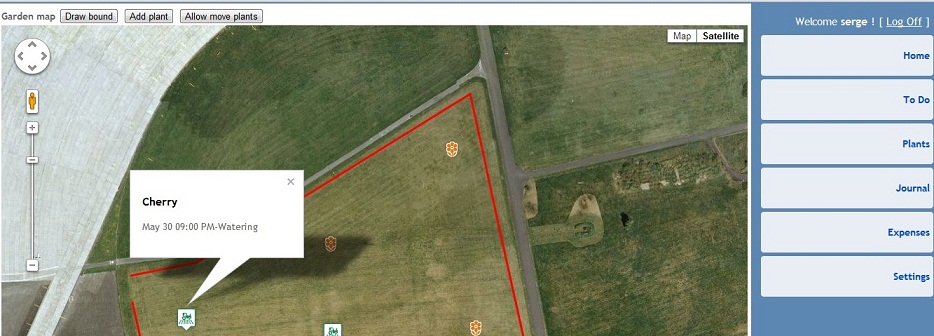
This application was created at the request of my wife Victoria. She loves house plants and cares for a small indoor garden. Several times I started working on this problem, but every time delayed due to other cases. At first, I planned to write a small program for desktop computers, but then I thought that the gardeners are not very convinient to walk around the garden with a computer. As time went on sale tablets iPad, Andoid and other. But I did not know very well how to write applications for them. So I decided to make a web application running on any device. It's really cool when any user starts to work immediately with your application without any installations and configurations. Now that everything is almost ready I can say what Garden Diary can do. First, you can record all your plants, along with their pictures. Then enter for each plant the necessary procedures that you do on a regular basis such as watering, fertilizing, weeding and so on. All procedures are automatically placed in the to-do list that needs to be done, and then implement them in your annual Gardener's Journal. Just in time to create this application, I listened to amazing lectures by Steve Huffman on udasity.com where he suggested how to use Google Map in own web applications. It was a great idea. Now, any gardener can show all his plants directly on the map and the program will show when and where he should work now. I hope Garden Diary will be useful not only my wife but also to other gardeners and plant lovers. itgardendiary

Friday, March 23, 2012

Online inventory system SaaS

We are going to start soon a new web service for inventory accounting. It will an online inventory system for apparel and other business. Nothing to install register your account and work from any device.

Tuesday, January 31, 2012

Paging for MS SQL query

It's a usual task get some records from a big table. MySql has a simple operator Limit offset,pagesize
If you want to get 16-20 records from the table Customers you write in MySql
SELECT * FROM Cbstomers LIMIT 15,5

It's a not trivial task for MS SQL query. We should write the next query :

SELECT * FROM (SELECT TOP 5 CustomerID,FullName From (SELECT TOP 20 Customers.CustomerID, Customers.FullName
FROM Customers
ORDER BY Customers.CustomerID ASC) As T2 Order by CustomerID DESC) ORDER BY CustomerID ASC;

page size=5
current page=4
current page x page size=20

Wednesday, July 20, 2011

Insert XML examples in a blog

When I wrote the previous blog, I encountered a small problem. How to insert an example of my XML file in the blog. I'm using the Notepad function Edit-Replace. First I've replaced the symbol < on &lt;


Then, I've replaced the symbol > on &gt;.


After that, I've copy pasted the new text in my blog.

Tuesday, July 19, 2011

HTTPS in Google Application Engine

Now I'm playing with Google Application Engine.GAE is a terrific tool for learning requires. If you want to work with your application via HTTPS simple add the next lines to web.xml:
<security-constraint>
<web-resource-collection>
<web-resource-name>all</web-resource-name>
<url-pattern>/*</url-pattern>
</web-resource-collection>
<user-data-constraint>
<transport-guarantee>CONFIDENTIAL</transport-guarantee>
</user-data-constraint>
</security-constraint>

You do not need to buy a certificate and not need to configure anything.

Sunday, April 10, 2011

MySQL and ADO

I am getting this error message in VB6 with MySQL

-2147217864 Row cannot be located for updating. Some values may have been changed since it was last read.
I've opened recordset and change some fields . Then I tried to update recordset and had the error message
Set rsCt = New Recordset
rsCt.CursorLocation = adUseClient
rsCt.open SQLstring, mConn, adOpenStatic, adLockOptimistic
rsCt!OrderNumber = pbOrderNumber
rsCt!CustomerID = custID
rsCt.Update

I spent several hours searching for a solution. Changed primary keys in my tables,used different options in rsCt.Open . And eventually found a small message on forum.mysql.com


Open properties fo your DNS (Windows XP: Control Panel->Administrative Tools->Data Sources) and find option Return Matching Rows (turn it on).

Also, you can do this under connection string specity parameter OPTION=2.

This should work...

Osman :D

I added to my connection string option=2

ConnectionString = "driver={MySQL ODBC 5.1 Driver};option=2,server=" & mySqlIP & ";uid=" & usr_id & ";pwd=" & pass & ";database=" & Database

Finally the problem is solved. Thanks Osman!!!